CapCut vs InVideo AI for marketing: Which Wins?
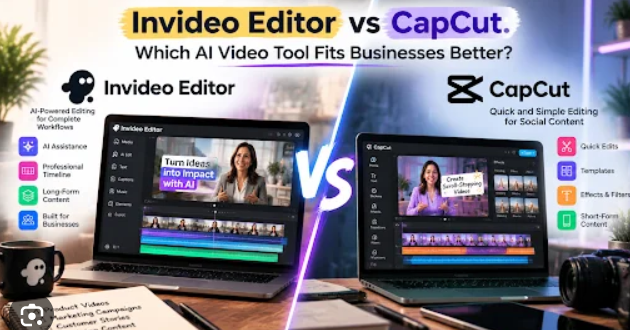
What each tool does and how it works
CapCut is a video editing platform for shaping and enhancing footage, while InVideo AI is a generative video creation platform that builds a draft from text-based input. The practical difference is where each tool fits: post-production versus ideation-to-video creation.
CapCut: edit and refine footage
CapCut is designed for creators and marketers who have video clips or other assets and want to assemble them with detailed control. Its multi-track timeline supports trimming, splitting, and arranging clips, while keyframe animation and transitions help shape pacing and visual movement.
Its AI-assisted tools can improve footage through capabilities such as stabilization, sharpening, and color correction. After arranging clips, users can add text overlays, effects, stickers, filters, and audio, including royalty-free music from its asset library. The workflow is hands-on: the editor decides what appears, when it appears, and how the finished video looks.
That makes CapCut a natural fit for short-form social content, vlogs, and brand advertisements where timing and visual identity matter. A social media manager with product footage, for example, can select specific shots, refine their presentation, and add branded text rather than relying on an automatically assembled draft.
InVideo AI: turn a concept into a draft
InVideo AI starts with a prompt, script, or marketing idea. It can generate a video draft by creating a script, selecting stock footage, generating a voiceover, and adding subtitles. The workflow is built to reduce manual timeline editing, so users can move from a written concept to a reviewable video with fewer production steps.
After generation, users preview the draft and can make changes using text-based commands or swap particular media clips. This gives the creator a way to adjust the result without building the entire video on a timeline from scratch.
For example, a small business owner with a blog post but no original footage can use its content as the basis for a video summary. InVideo AI is also suited to marketing teams and solo creators who need to produce frequent content without deep editing skills. The key trade-off is that automated assembly saves effort, while CapCut offers more direct control over detailed visual decisions.
CapCut vs InVideo AI for marketing: feature comparison
CapCut gives marketers greater hands-on control over footage and finishing; InVideo AI automates more of the journey from concept to video draft. Compare them by workflow, not by assuming that one tool is universally better.
A practical comparison matrix
Marketing need | CapCut | InVideo AI |
|---|---|---|
Starting point | Raw footage or existing assets | Prompt, script, or marketing idea |
Main purpose | Edit and enhance video | Generate a complete video draft |
Core workflow | Arrange and refine clips on a multi-track timeline | Generate, preview, and revise a text-led video |
Editing approach | Manual timeline editing with AI-assisted enhancements | Automated creation with text-based changes and media swaps |
Relevant capabilities | Trimming, splitting, keyframes, transitions, stabilization, sharpening, color correction, effects, and audio | Scriptwriting, stock-footage selection, voiceover generation, and subtitle overlays |
Strong fit | Precise timing, branded visuals, vlogs, social videos, and polished ads | Blog-to-video summaries, prompt-led social updates, and scalable marketing production |
Main consideration | Requires active editing decisions and source material | Automation can speed creation, but the draft still needs review |
Neither platform should be treated as a substitute for a marketing brief. CapCut’s editing control is valuable when the footage, brand details, and exact sequence are important. InVideo AI can be more efficient when the priority is turning an idea or script into a complete draft quickly.
Which tool fits your marketing goal?
Choose CapCut if you already have footage and want to control the final look. It is especially useful when a campaign depends on a particular product shot, visual sequence, pace, or branded treatment. Its editing and enhancement tools make it the more direct fit for refining material rather than generating the entire video from a text prompt.
Choose InVideo AI if your starting point is a concept or script and you need a video without assembling every element manually. Its automated script, voiceover, stock-media, and subtitle workflow can support higher-volume content creation, such as turning written material into video summaries.
Before committing to either workflow, identify what is limiting your production: editing time, access to usable footage, or the need for precise creative control. Bestvideotool’s comparison perspective is that the right choice follows the production bottleneck—not a blanket claim that automation or manual editing is always superior. For more tool-selection context, visit Bestvideotool.
How to choose and use the right workflow
A useful selection process begins with your source material and ends with a reviewed export. Match the tool to the task, then evaluate the finished video against the marketing brief before publishing.
Step-by-step: build with CapCut
Import: Upload raw footage or other assets into the project timeline.
Edit: Trim, split, and arrange clips to establish the sequence and pacing.
Enhance: Apply available AI-powered improvements, such as stabilization, sharpening, or color correction, where they serve the footage.
Polish: Add text overlays, effects, transitions, and audio tracks. Use the asset library’s stickers, filters, or royalty-free music when appropriate.
Export: Render the completed video for social media or professional distribution.
This approach works well when the source material is part of the campaign’s value—for instance, a product demonstration where specific actions must appear in a particular order. Keep branding, timing, and the purpose of each shot in view as you edit; technical enhancement alone does not make the video effective.
Step-by-step: generate with InVideo AI
Prompt: Enter a clear prompt, script, or marketing concept.
Generate: Let the platform create a script and select relevant stock media, with voiceover and subtitle elements handled as part of its automated workflow.
Review: Preview the draft before treating it as ready to publish.
Edit: Use text-based commands to revise the script or swap media clips where needed.
Export: Finalize and download the video.
For a blog summary, start with the central idea and the audience-facing message rather than pasting in text without considering its purpose. Review whether the generated script communicates the intended point and whether selected media supports it. Automation accelerates the first draft; human review remains important for relevance and brand fit.
Expert tips, 2026 outlook, and FAQs
In 2026, these platforms represent two complementary marketing workflows: precise post-production and automated concept-to-video creation. The best choice depends on the content pipeline, and there is no single tool that is right for every campaign.
Avoid common workflow mistakes
With CapCut, do not expect automated generation to replace the editing process: its core strength is refining footage through timeline-based decisions. Organize clips around the intended story, then use stabilization, sharpening, or color correction selectively. Adding effects and overlays before the video’s sequence is clear can make polish harder to assess.
With InVideo AI, do not treat a generated draft as an automatically approved campaign asset. Preview the script, footage, voiceover, and subtitles together. If a media clip does not support the message, swap it; if the narrative misses the marketing concept, revise it with text-based commands before exporting.
A simple test helps teams compare workflows fairly: create one representative video in each tool using the material each is meant to handle. Note which process better meets the brief, how much revision it needs, and whether the team can repeat it consistently. Avoid relying on unsupported performance percentages; measure against your own production requirements.
Bestvideotool’s 2026 perspective
For a campaign built around original footage, CapCut is the editor’s choice: it gives creators, social media managers, and editors direct control over visual sequence and refinement. For a campaign built around written ideas and a need to produce content quickly, InVideo AI is the creator’s accelerator, automating multiple steps from script to draft.
These tools can also serve different stages of a broader content operation. A team might use InVideo AI to turn written concepts into initial videos and use a hands-on editor when footage requires precise visual treatment. This is a workflow option, not a promise of a specific integration between the products.
For 2026 planning, define the task before choosing the tool: refine existing footage, or generate a video from text? That distinction is more useful than comparing the platforms as though they perform identical jobs. The following answers summarize the decision.
FAQ
Is CapCut or InVideo AI better for marketing?
Neither is universally better. CapCut is better suited to editing and enhancing existing footage with detailed timeline control; InVideo AI is better suited to generating videos from prompts, scripts, or marketing concepts.
Can InVideo AI make a video without raw footage?
Yes. Its workflow can generate a video from a prompt, script, or idea by creating a script and selecting stock footage, along with voiceover generation and subtitle overlays.
Should I use CapCut for social media videos?
Use CapCut when you want to edit footage into social content with control over clip order, timing, effects, and text. It is suited to short-form content such as TikTok and Reels, as well as vlogs and polished brand advertisements.
Which tool is better for turning blog posts into videos?
InVideo AI is the more direct fit for turning written material into video summaries because it creates a video from text-based input and automates key production steps. Review the generated draft and revise it before export.
Video Tools
-
1. Zencoder
-
2. Dolby.io
-
3. JW Player
-
4. Wowza
-
5. Cloudinary
-
6. AWS Elemental MediaLive
-
7. AWS Elemental MediaConvert
-
8. api.video
-
9. Vimeo OTT
-
10. Bunny Stream
-
11. Cloudflare Stream
-
12. Mux
-
13. Pexels
-
14. Pixabay
-
15. Mixkit
-
16. Freepik
-
17. PremiumBeat
-
18. Pond5
-
19. Adobe Stock
-
20. Shutterstock
-
21. Epidemic Sound
-
22. Storyblocks
-
23. Artlist
-
24. Motion Array
-
25. Envato Elements
-
26. SocialPilot
-
27. Morningfame
-
28. Vista Social
-
29. Publer
-
30. Later
-
31. Hootsuite
-
32. Sprout Social
-
33. Buffer
-
34. SocialBee
-
35. Metricool
-
36. TubeBuddy
-
37. vidIQ
-
38. Castmagic
-
39. http://repurpose.io
-
40. 2short.ai
-
41. Submagic
-
42. Exemplary AI
-
43. Revid.ai
-
44. Choppity
-
45. Vidyo.ai
-
46. Munch
-
47. Klap
-
48. Vizard
-
49. OpusClip
-
50. DaVinci Resolve
-
51.
 CapCut
-
52. Nero AI Video Upscaler
-
53. VideoProc Converter AI
-
54. TensorPix
-
55. Aiarty Video Enhancer
-
56. AVCLabs Video Enhancer AI
-
57. Vmake AI
-
58. Topaz Video AI
-
59. HitPaw VikPea
-
60. UniFab AI
-
61. Biteable
-
62. Moovly
-
63. Vyond
-
64. Animaker
-
65. Placeit Video Maker
-
66. Renderforest
-
67. Adobe After Effects
-
68. VistaCreate
-
69. Placeit
-
70. Motion Array
-
71. Envato Elements
-
72. Canva
-
73. Podcastle
-
74. Cleanvoice AI
-
75. Auphonic
-
76. Adobe Podcast
-
77. Kits AI
-
78. Listnr
-
79. Resemble AI
-
80. WellSaid Labs
-
81. LOVO AI
-
82. Descript
-
83. PlayHT
-
84. Speechify
-
85. Murf AI
-
86. ElevenLabs
-
87. Corel VideoStudio
-
88. PowerDirector
-
89. Final Cut Pro
-
90. DaVinci Resolve
-
91. Pinnacle Studio
-
92. CyberLink PowerDirector
-
93. Movavi Video Editor
-
94. Adobe Premiere Pro
-
95. Filmora
-
96. CapCut
-
97. VEED
-
98. Riverside Clips
-
99. Wirecast
-
100. vMix
-
101. SquadCast
-
102. Zencastr
-
103. OBS Studio
-
104. Camtasia
-
105. ScreenPal
-
106. Ecamm Live
-
107. Descript
-
108. Loom
-
109. Restream
-
110. StreamYard
-
111. Riverside
-
112. Pictory API
-
113. Descript
-
114. D-ID
-
115. HeyGen
-
116. FlexClip
-
117. Runway
-
118. Synthesia
-
119. Creatify
-
120.
 InVideo AI
-
121. Fliki
-
122. VEED
-
123. Pictory
-
124.
 Final Draft
-
125.
 Plottr
-
126.
 Boords
-
127.
 Sudowrite
-
128.
 Rytr
Rytr
-
129.
 Writesonic
-
130.
 Simplified
-
131.
 Jasper
-
132.
 Google Keyword Planner
-
133.
 SparkToro
-
134.
 Social Blade
-
135.
 Keyword Tool
-
136.
 Glimpse
-
137.
 AlsoAsked
-
138.
 Ahrefs
-
139.
 Semrush
-
140.
 BuzzSumo
-
141.
 AnswerThePublic
-
142.
 Google Trends
-
143.
 TubeBuddy
-
144.
 vidIQ
vidIQ